Running a cafe without proper POS software feels fine until a Friday lunch rush hits simultaneously with a delivery spike and a kitchen that has no idea which order came first. A customer is handed the wrong order. A popular item runs out mid-service because nobody noticed stock was low. The till reconciliation at closing takes forty minutes and still doesn't balance. Sound familiar?
Modern cafe POS software solves all of this — and the best platforms now go well beyond order-taking, adding kitchen display systems, AI-powered inventory predictions, and customer loyalty features that were previously only available to large chain restaurants. This guide covers what really matters when choosing cafe POS software for an independent cafe or quick-service restaurant.
Who this guide is for: Owners and managers of independent cafes, coffee shops, and quick-service restaurants who want to streamline operations, reduce order errors, improve kitchen coordination, and make smarter stocking decisions — without the complexity of enterprise restaurant management platforms.
What Is a Cafe POS System (and Why Generic Software Doesn't Cut It)?
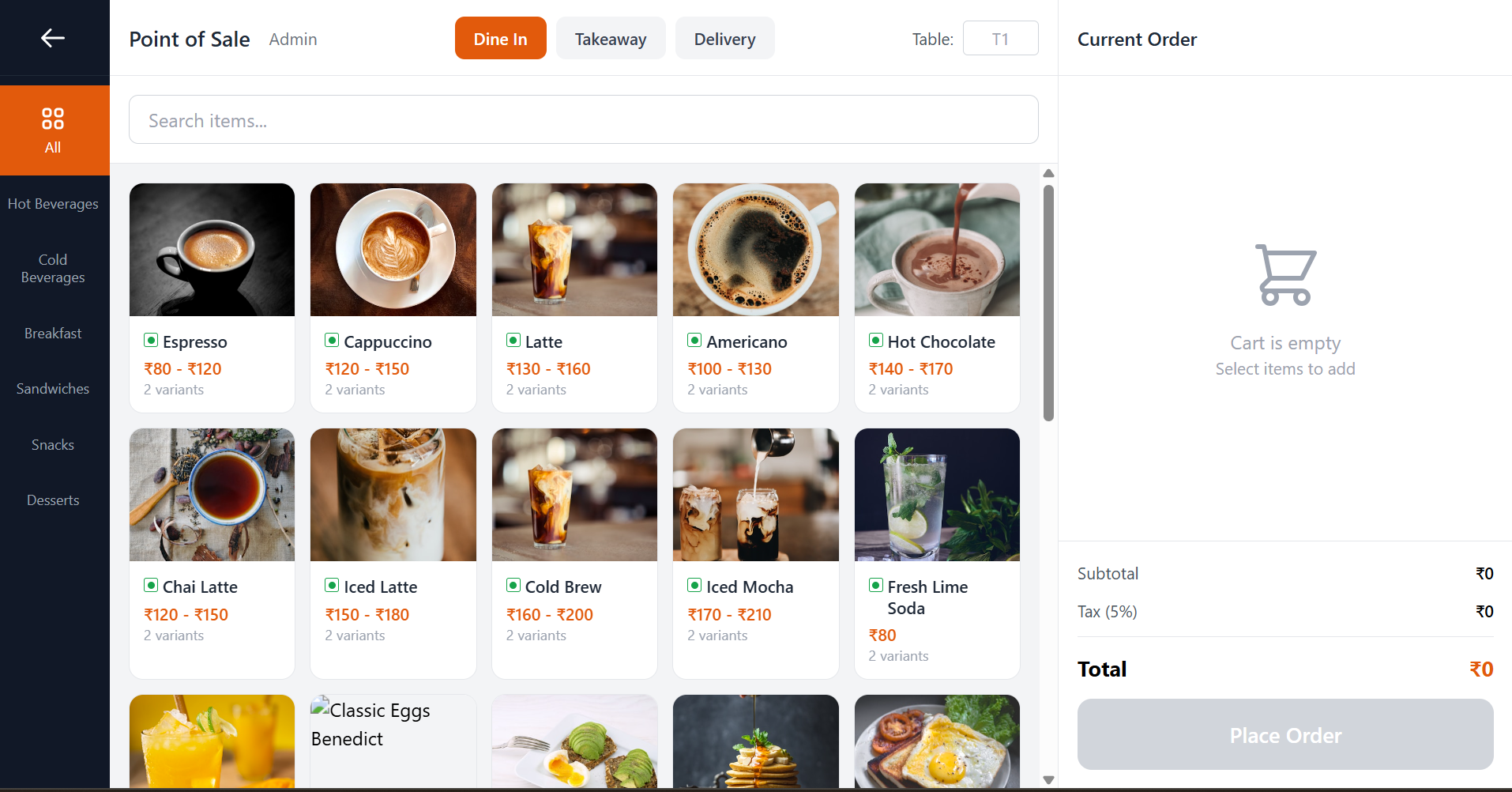
A Point of Sale (POS) system is the software at the heart of your cafe's order flow — the interface staff use to take orders, apply modifiers, process payments, and send tickets to the kitchen. But a cafe-specific POS does much more than a generic retail till system.
Generic retail POS software is designed for scanning barcoded products off a shelf. A cafe menu is fundamentally different: items have variants (size, milk type, sugar level), add-ons (extra shot, oat milk, syrup), and availability windows (seasonal items, sold-out flags). Orders flow to a kitchen that needs real-time visibility. Tables need to be managed. Multiple payment types need splitting. A cafe POS built for this context handles all of it natively; a generic retail system requires painful workarounds.
A complete cafe POS system handles:
- Dine-in ordering with table management and order-per-seat tracking
- Takeaway counter orders with customer name tags
- Delivery orders with mode-specific workflow and routing
- Item variants, add-ons, and veg/non-veg labelling
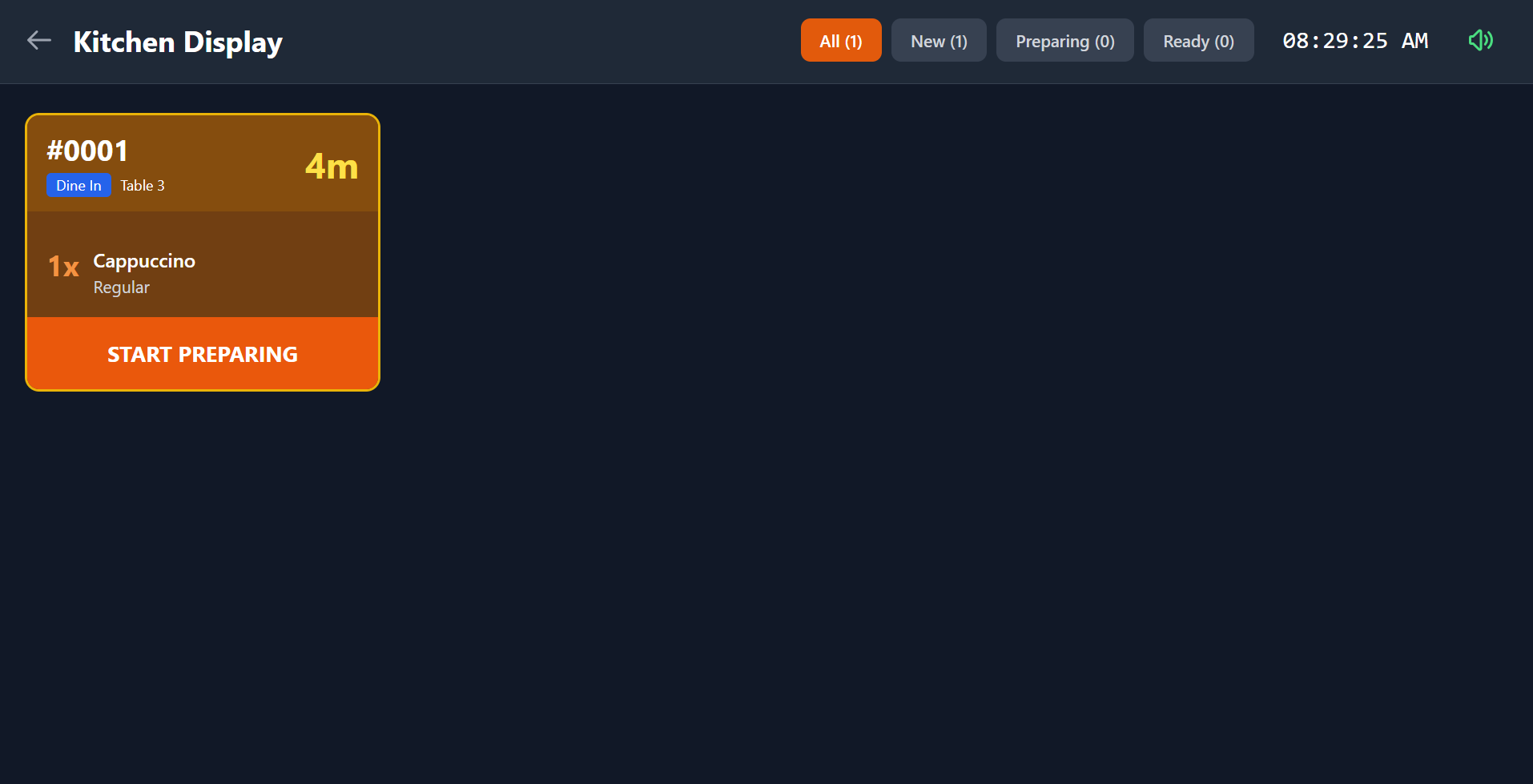
- Real-time kitchen display with order timing and status
- Multi-payment support — cash, card, UPI, split payments
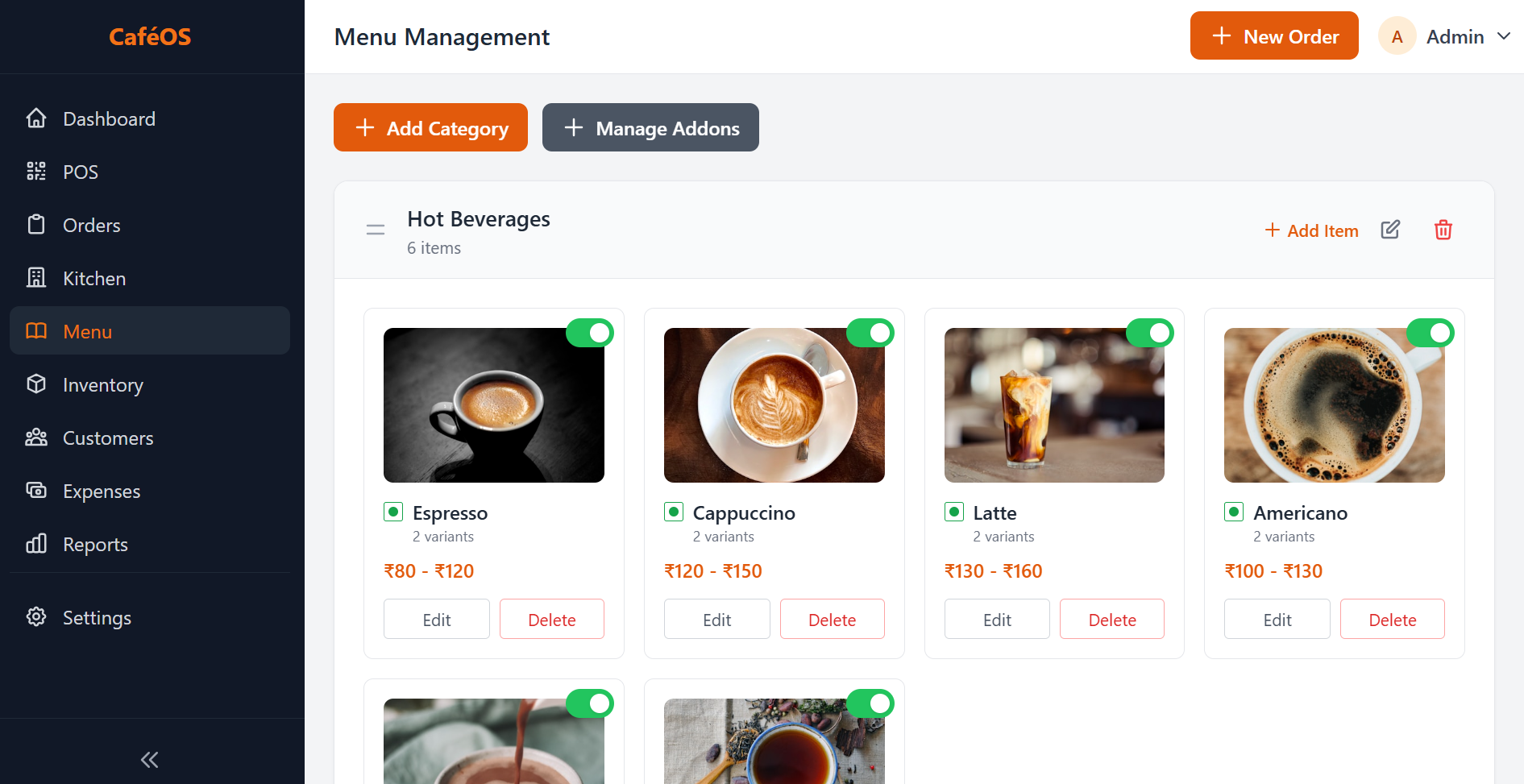
- Menu management with availability toggles and category organisation
- Inventory tracking with automated reorder suggestions
- Customer loyalty and repeat-visit intelligence
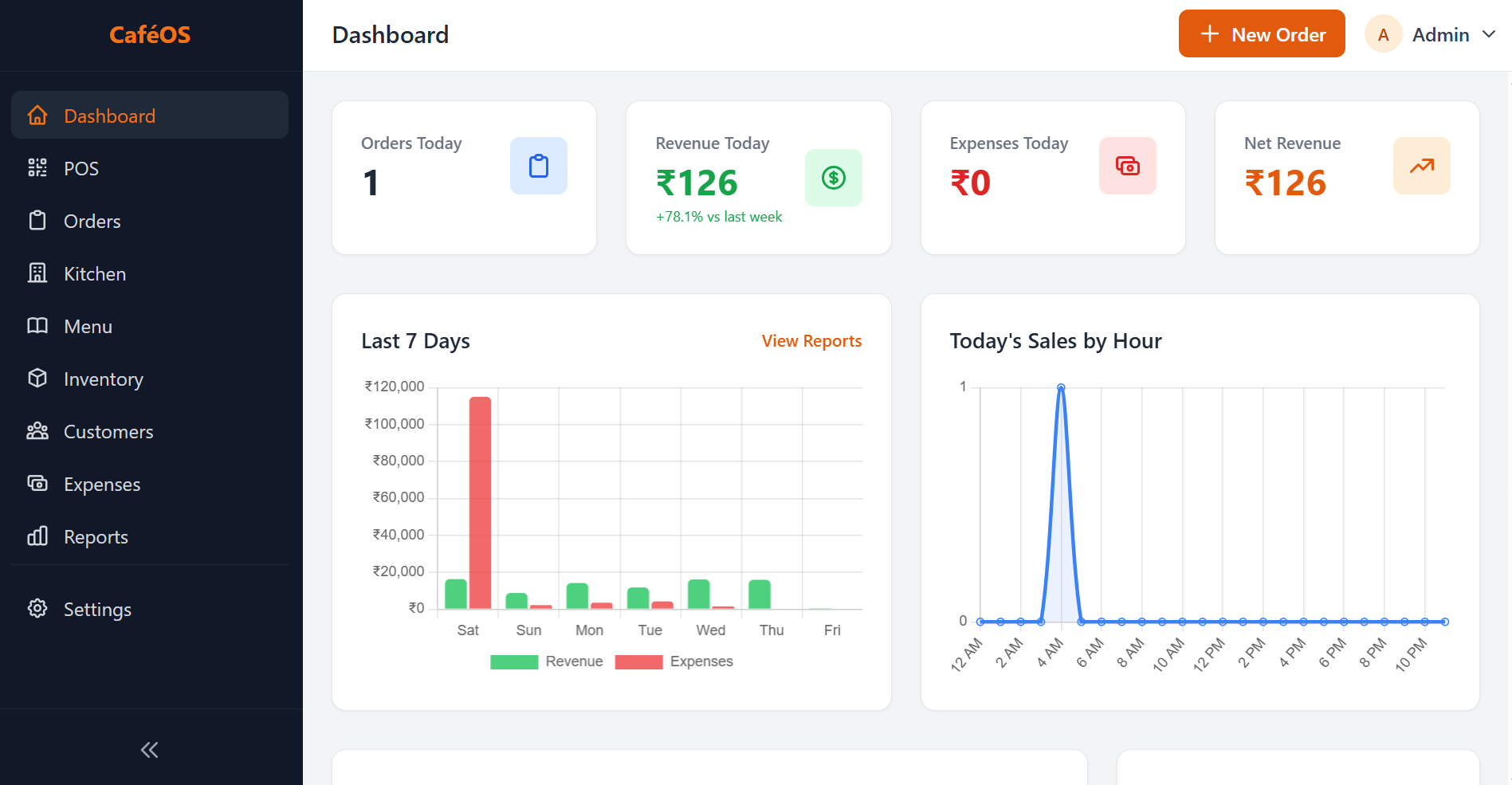
- Sales reporting and trend analytics
The Daily Pain Points CafeOS Solves
Before looking at features in the abstract, it helps to be specific about the operational problems that good cafe POS software actually fixes.
Order Errors and Kitchen Miscommunication
Handwritten kitchen tickets get lost, smudged, or misread. Verbal relay across a noisy counter introduces errors. A digital order flow — from POS to kitchen display — eliminates this entirely. The kitchen sees exactly what was ordered, with modifiers, in the sequence the orders arrived, on a screen they can bump when complete.
Inventory Guesswork
Most independent cafes manage stock by feel: the owner walks in at 7am, looks at the fridge, and makes a mental estimate. Running out of oat milk on a Saturday morning or over-ordering ingredients that spoil before the weekend is a direct margin hit. Smart inventory systems track consumption patterns and predict when you'll run out before it happens.
Manual Reporting and End-of-Day Reconciliation
Manually totalling receipts, counting cash, reconciling card terminals, and building a daily sales summary takes time every single day — often the time when you want to be closing the cafe, not doing arithmetic. Automated reporting produces the full picture instantly: sales by item, payment method breakdown, peak hour analysis, and comparison to the previous week.
Losing Regular Customers Silently
A customer who visited twice a week and stopped coming three weeks ago is invisible in a manual system. Customer intelligence features flag this automatically, giving you the information you need to reach out before a regular becomes a former customer.
Key insight: Cafes that implement a full POS system with kitchen display and inventory tracking typically report a 30–40% reduction in order errors and save 45–90 minutes of daily administrative time across order management and end-of-day reporting.
Core Features of a Modern Cafe POS
Here is a feature-by-feature breakdown of what CafeOS includes and why each element matters for day-to-day cafe operations:
| Feature | Status in CafeOS | Why it matters |
|---|---|---|
| Point of Sale (dine-in, takeaway, delivery) | ✓ Included | Single interface for all order modes; no switching between apps |
| Table management | ✓ Included | Visual floor plan, per-table order tracking, easy transfer and split |
| Item variants and add-ons | ✓ Included | Size, milk type, extras — configured per item, shown on kitchen ticket |
| Kitchen Display System (KDS) | ✓ Included | Real-time order screen for kitchen staff; bump-to-complete workflow |
| Multi-payment support | ✓ Included | Cash, card, UPI, and split payments on a single order |
| Menu management | ✓ Included | Category organisation, veg/non-veg labels, availability toggle per item |
| Smart Inventory (AI) | ✓ Included | Stockout predictions and automatic reorder suggestions before items run out |
| Customer loyalty and churn detection | ✓ Included | Loyalty points, churn risk alerts, cross-sell suggestions from order history |
| AI Sales Forecasting | ✓ Included | Revenue predictions by day and week to guide staffing and prep decisions |
| Reports and analytics | ✓ Included | Daily sales, top items, payment breakdown, hourly trend charts |
The Kitchen Display System: Why It Matters
The Kitchen Display System (KDS) is one of the highest-impact features in any cafe POS platform, and one of the most underestimated by cafe owners who haven't used one before. Here is what it changes.
From Paper Tickets to Real-Time Screens
Traditional kitchen workflow relies on the POS printing a paper ticket that someone tears off and pins to a rail. During a busy service, the rail fills up, tickets fall, priorities get confused, and nobody can tell at a glance which order has been waiting longest. A KDS replaces the paper rail with a screen that shows every active order, colour-coded by wait time, with the full item list and modifiers clearly displayed.
Bump-to-Complete Workflow
When the kitchen completes an order, they bump it on the KDS — removing it from the active screen and logging the completion time. This creates a real-time record of how long each order took to prepare, which the manager can review to identify bottlenecks in the kitchen workflow.
Recall for Corrections
If a customer asks to modify an order after it has already been sent to the kitchen, the KDS recall function brings the original order back into view so kitchen staff can adjust rather than starting over or checking with front of house verbally.
For cafes handling 50 or more orders per service, the KDS is not optional — it is the difference between a smooth service and controlled chaos.
AI-Powered Features: Smarter Than a Spreadsheet
CafeOS includes three AI-powered modules that go beyond what traditional POS software offers. These are not marketing buzzwords — each addresses a specific, costly operational problem.
AI Sales Forecasting
Using your historical sales data combined with day-of-week patterns and trend analysis, CafeOS predicts revenue and order volume for upcoming days and weeks. This lets you make more informed decisions about staff scheduling, prep quantities, and ingredient ordering — reducing both under-staffing on busy days and food waste on quiet ones.
Smart Inventory with Stockout Predictions
The smart inventory system tracks ingredient consumption against your menu and flags items that are on track to run out before your next delivery window. Rather than discovering mid-service that you have run out of a key ingredient, the system alerts you in advance and generates a reorder suggestion. For cafes with thin margins, reducing stockouts and over-ordering directly improves profitability.
Customer Intelligence and Churn Detection
Every time a customer makes a purchase, CafeOS builds a record of their visit frequency and preferences. The churn detection algorithm identifies customers who typically visit multiple times per week but have not been in for an unusual length of time — flagging them for a re-engagement initiative. The cross-sell engine analyses order history to suggest complementary items at point of sale, increasing average order value without requiring staff to memorise upsell scripts.
Real impact: A cafe using CafeOS churn detection and loyalty features reported a 19% increase in returning customer visits within two months, primarily through timely re-engagement of at-risk regulars who had reduced their visit frequency.
How CafeOS Handles Multiple Order Modes
One of the most common operational challenges for cafes is managing dine-in, takeaway, and delivery simultaneously without orders getting confused or kitchen displays becoming unmanageable. CafeOS treats each order mode as a distinct workflow with appropriate UI and routing, while feeding all orders into the same kitchen display and reporting system.
Dine-In: Table-Based Ordering
For dine-in, the POS shows a floor plan of your cafe layout. Staff select the table, take the order — including modifiers and course sequencing — and send it directly to the kitchen. Orders can be held for courses, split across multiple bills, or transferred between tables without losing order history.
Takeaway: Counter and Phone Orders
Takeaway mode simplifies the interface to a direct item-selection and payment flow, tagged with a customer name or number for collection. The kitchen sees takeaway orders clearly differentiated from dine-in on the KDS, so packing and presentation workflows are handled correctly.
Delivery: Third-Party and Own-Fleet
Delivery orders enter the same POS and kitchen display flow, tagged with the delivery mode and customer address. The system tracks which orders are awaiting pickup, in transit, or delivered, giving the manager a real-time view of all active delivery orders without switching to a separate platform.
See CafeOS in Action
Get a live demo of the full POS, kitchen display, and AI features tailored to your cafe's size and order mix. No enterprise sales process — just a working walkthrough of the tools that matter for your operation.
Explore CafeOS →Implementation: Up and Running in a Day
One of the most common objections to adopting new POS software is the fear of downtime during setup. CafeOS is designed for rapid deployment — a well-prepared cafe can be fully operational on the new system within a single day.
Morning: Menu and Settings Setup
The first step is building your menu in the system. With CafeOS's menu editor, this means creating categories, adding items with pricing, setting variants and add-ons, and configuring veg/non-veg labels and availability. For a cafe with 40–80 menu items, this typically takes two to three hours. Table layout setup for dine-in cafes adds another thirty minutes.
Midday: Staff Orientation
Run a quick session with front-of-house staff on the POS order flow and payment processing — typically forty-five minutes for staff who have used any touchscreen device before. Kitchen staff need a fifteen-minute walkthrough of the KDS bump workflow. The interface is designed to be learnable fast; most staff are comfortable taking real orders within an hour of training.
Afternoon: Go Live with Support
Start with a soft launch during a quieter service period. Run the first few orders through the system with a manager watching. By the evening service, staff confidence is typically established and the system is running independently. The first day's closing report — generated automatically — gives you an immediate sense of the reporting value compared to manual reconciliation.
Frequently Asked Questions
Bottom Line
The right cafe POS software is the operational backbone of a well-run food business. It eliminates order errors, keeps the kitchen informed in real time, gives you a clear financial picture at the end of every day, and — in modern platforms — uses AI to help you make smarter decisions about inventory, staffing, and customer retention.
For independent cafes and quick-service restaurants, the most important criteria are ease of use under service pressure, reliable kitchen display integration, and reporting that actually saves time rather than adding to it. Avoid platforms with bloated feature sets designed for large restaurant chains — what you need is a system built for the pace and scale of an independent operation.
If you are running an independent cafe, coffee shop, or quick-service restaurant, CafeOS is worth a look — a complete POS and restaurant management system built for exactly this scale, with AI features that were previously only available to large chains.